A Content Security Policy (CSP) is a browser security mechanism that helps prevent certain types of web attacks, such as Cross-Site Scripting (XSS) and data injection attacks by controlling what resources a web page is allowed to load and execute.
CSP lets a website define rules like:
- Where scripts can be loaded from
- If inline JavaScript is allowed
- Which domains can load images, styles, or frames
- Whether external resources are blocked or restricted
Content Security Policy Lab
To demonstrate the impact of CSP, the following Python Flask application is susceptible to reflected Cross Site Scripting (XSS). The application also allows you to set different content security policy configurations.
from flask import Flask, request, render_template_string, Response
app = Flask(__name__)
CSP_MODE = "strict"
@app.after_request
def add_csp(response):
if CSP_MODE == "strict":
response.headers["Content-Security-Policy"] = (
"default-src 'self'; "
"script-src 'self'; "
"object-src 'none';"
)
elif CSP_MODE == "unsafe-inline":
response.headers["Content-Security-Policy"] = (
"default-src 'self'; "
"script-src 'self' 'unsafe-inline'; "
"object-src 'none';"
)
elif CSP_MODE == "unsafe-eval":
response.headers["Content-Security-Policy"] = (
"default-src 'self'; "
"script-src 'self' 'unsafe-eval'; "
"object-src 'none';"
)
return response
@app.route("/mode/<mode>")
def set_mode(mode):
global CSP_MODE
valid_modes = [
"off",
"strict",
"unsafe-inline",
"unsafe-eval",
]
if mode in valid_modes:
CSP_MODE = mode
return f"""
<h1>CSP Mode Changed</h1>
<p>CSP_MODE = {CSP_MODE}</p>
<a href="/">Back to lab</a>
"""
@app.route("/")
def index():
user_input = request.args.get("q", "")
eval_code = request.args.get(
"eval_code",
"alert('EVAL EXECUTED')"
)
run_eval = request.args.get("run_eval")
eval_script = ""
if run_eval:
eval_script = (
f'<script src="/js/eval-demo.js?code={eval_code}"></script>'
)
html = f"""
<!doctype html>
<html>
<head>
<title>CSP Lab</title>
</head>
<body>
<p>
<b>Current CSP Mode:</b> {CSP_MODE}
</p>
<ul>
<li><a href="/mode/off">CSP OFF</a></li>
<li><a href="/mode/strict">STRICT</a></li>
<li><a href="/mode/unsafe-inline">UNSAFE-INLINE</a></li>
<li><a href="/mode/unsafe-eval">UNSAFE-EVAL</a></li>
</ul>
<hr>
<b>Reflected XSS Demo</b>
<form method="GET">
<input
name="q"
size="60"
value="<script>alert("XSS")</script>"
>
<button type="submit">
Submit
</button>
</form>
<p>
You searched for:
{user_input}
</p>
<hr>
<b>eval() Demo</b>
<form method="GET">
<input
name="eval_code"
size="60"
value="{eval_code}"
>
<input
type="hidden"
name="run_eval"
value="1"
>
<button type="submit">
Run eval()
</button>
</form>
<p>
Current eval string:
</p>
<pre>{eval_code}</pre>
{eval_script}
</body>
</html>
"""
return render_template_string(html)
@app.route("/js/eval-demo.js")
def eval_demo():
code = request.args.get(
"code",
"alert('EVAL EXECUTED')"
)
js = f"""
try {{
eval({code!r});
document.body.insertAdjacentHTML(
'beforeend',
'<p>eval() succeeded</p>'
);
}}
catch (e) {{
document.body.insertAdjacentHTML(
'beforeend',
'<p style="color:red;">eval() blocked or failed: '
+ e.message +
'</p>'
);
console.error(e);
}}
"""
return Response(
js,
mimetype="application/javascript"
)
if __name__ == "__main__":
app.run(debug=True)
Content Security Policy Operation
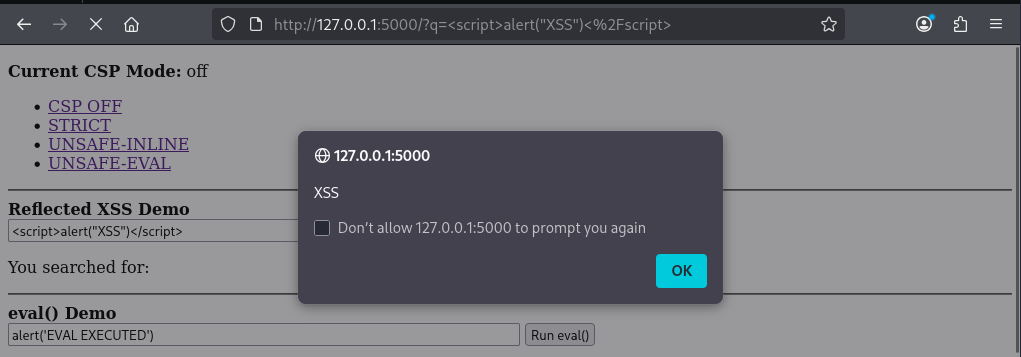
With CSP set to off, entering an XSS payload into the search box shows the browser will execute the code.
Enabling the CSP toggle will cause the application to return the Content-Security-Policy header.
HTTP/1.1 200 OK
Server: Werkzeug/3.1.8 Python/3.13.12
Date: Thu, 25 Jun 2026 08:24:31 GMT
Content-Type: text/html; charset=utf-8
Content-Length: 404
Content-Security-Policy: default-src 'self'; script-src 'self'; object-src 'none';
Connection: close
The policy directives translate to the following.
- default-src ‘self’: This is the fallback policy for resource types that don’t have a more specific directive. ‘self’ means only resources from the same origin (same scheme, host, and port) as the page are allowed.
- script-src ‘self’: Specifically controls JavaScript sources. Overrides default-src for scripts. This will prevent inline script execution.
- object-src ‘none’: Disables plugins and embedded active content loaded through <object>, <embed>, and <applet>. Overrides default-src for scripts.
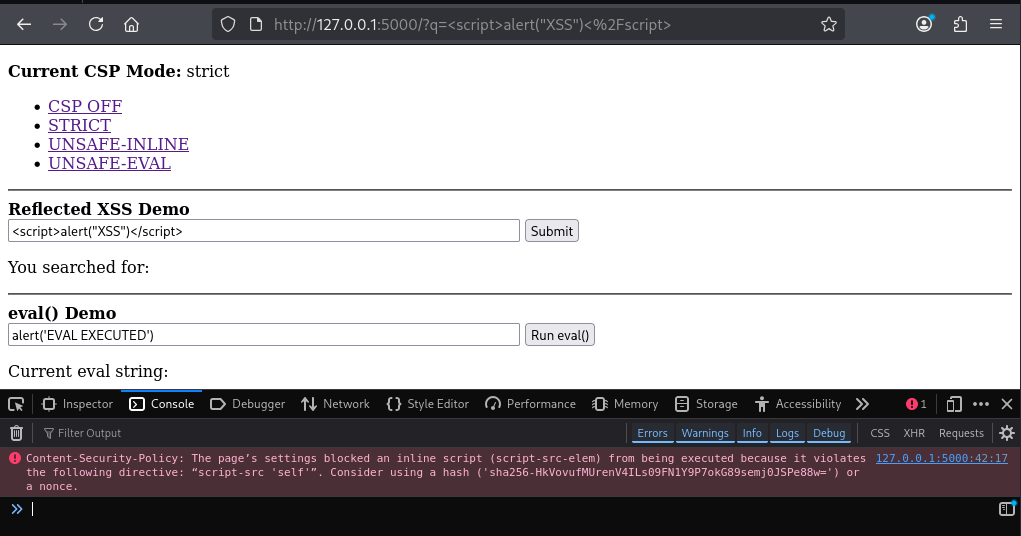
With the policy enabled, we can see the XSS payload no longer executes, and the browsers debug console informs us that a CSP violation has occurred.
Exploiting CSP Misconfigurations
unsafe-inline
unsafe-inline is a CSP keyword that allows JavaScript written directly inside the HTML document to execute. This severely undermines a CSP policies ability to mitigate XSS vulnerabilities.
HTTP/1.1 200 OK
Server: Werkzeug/3.1.8 Python/3.13.12
Date: Thu, 25 Jun 2026 09:30:44 GMT
Content-Type: text/html; charset=utf-8
Content-Length: 1270
Content-Security-Policy: default-src 'self'; script-src 'self' 'unsafe-inline'; object-src 'none';
Connection: close
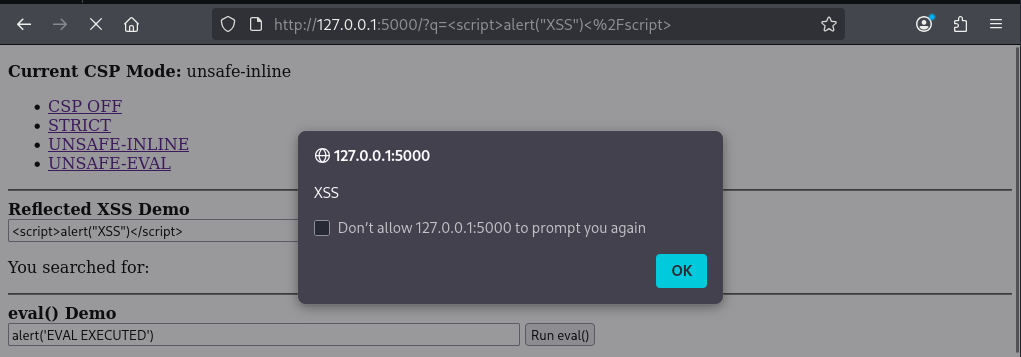
With this mode enabled, our XSS payload will execute.
unsafe-eval
unsafe-eval CSP keyword controls several script execution methods that create code from strings, including eval(). eval() is a built-in JavaScript function that takes a string and executes it as JavaScript code.
However, unsafe-eval also allows other methods that behave similar to eval (executing code from supplied strings) such as setTimeout().
HTTP/1.1 200 OK
Server: Werkzeug/3.1.8 Python/3.13.12
Date: Thu, 25 Jun 2026 09:45:14 GMT
Content-Type: text/html; charset=utf-8
Content-Length: 1307
Content-Security-Policy: default-src 'self'; script-src 'self' 'unsafe-eval'; object-src 'none';
Connection: close
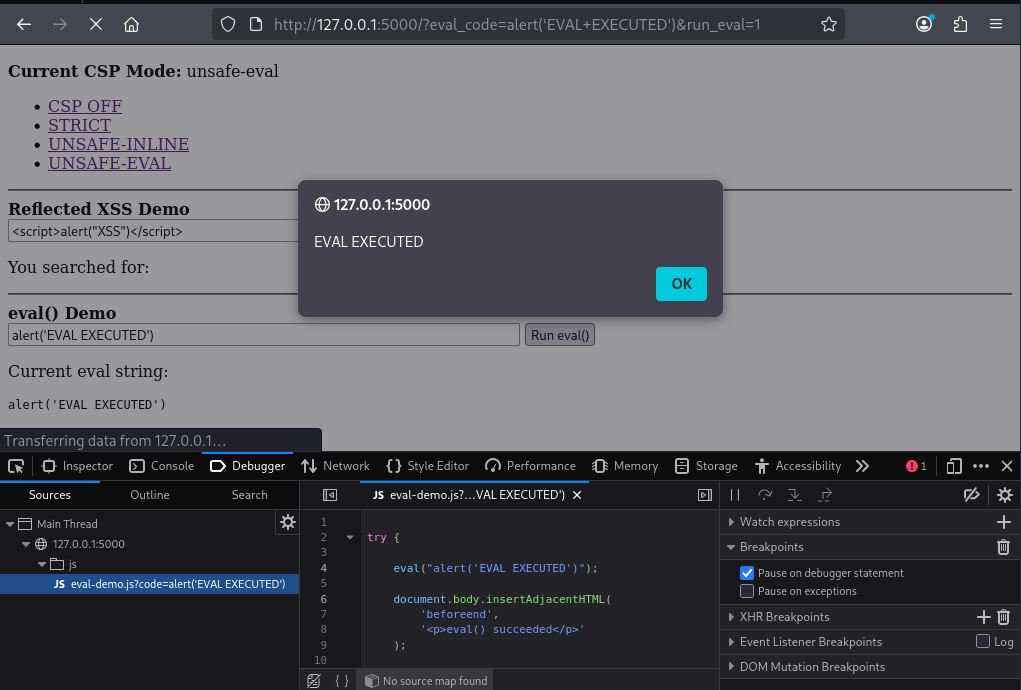
Since the application includes a script that implements eval(), having the unsafe-eval CSP header in place means we can execute arbitrary JavaScript code.
Trusting Dangerous Domains
A common CSP misconfigurations is allowing content from domains that an adversary may be able to host script content on. For instance, in the below policy any script content from cloudfront.net is allowed.
HTTP/1.1 200 OK
Server: Werkzeug/3.1.8 Python/3.13.12
Date: Thu, 25 Jun 2026 08:24:31 GMT
Content-Type: text/html; charset=utf-8
Content-Length: 404
Content-Security-Policy: default-src 'self'; script-src 'self' https://*.cloudfront.net; object-src 'none';
Connection: close
Granular Script Whitelisting
CSP can be configured to allow individual scripts using either hashing or nonce based checks.
Hashing
A CSP policy may include SHA hashes for inline scripts that are allowed to execute.
Content-Security-Policy: script-src 'self' 'sha256-bhHHL3z2vDgxUt0W3dWQOrprscmda2Y5pLsLg4GF+pI='
The browser calculates the hash at runtime when it parses the HTML response. Provided the hash matches, the script will be allowed to execute.
Nonce Checks
A nonce (number used once) is a random value generated by the server for each HTTP response. This is similar in operation to Anti-CSRF tokens.
The CSP policy can specify the nonce value.
Content-Security-Policy: script-src 'self' 'nonce-r4Nd0m123';
Scripts containing this would be allowed to execute.
<script nonce="r4Nd0m123">
    console.log("Trusted script");
</script>
In Conclusion
Content Security Policy is a powerful browser security mechanism that can significantly reduce the impact of vulnerabilities such as Cross-Site Scripting (XSS) by restricting which resources a web application is allowed to execute.
However, the security provided by CSP depends entirely on how carefully the policy is designed and maintained. It should be treated as a defence in depth measure, rather than solely relied on.